FAB Balance Check
FAB Balance Check allows customers to quickly view their account balance through convenient banking channels such as ATMs, online banking, and the FAB mobile app.

Ratibi Card Salary Check
Ratibi Card Salary Check lets you quickly check your salary balance through SMS, ATM, or FAB online banking and mobile app.
What Is FAB Bank Balance Check
A FAB balance check tells you how much money is in your account right now. You can check it any time of the day. FAB gives you many ways to do this. Some ways need internet. Some do not.
There are two kinds of balance you should know:
- Available balance. This is the money you can spend right now.
- Ledger balance. This is your total money, including payments that have not gone through yet.
These two numbers can look different. If you just made a payment, it may still be “pending.” That payment will lower your available balance first. It may take a few hours to fully update. This is normal and not an error.
Look up your prepaid balance
Fill in two details from your card, and we’ll hand you off to the official Magnati enquiry page to see the number. Nothing here gets saved or sent anywhere.
Which FAB Card or Account Do You Have?
Before you check your balance, know what card or account you have. Each type uses a different method. This will save you time.
| Card or Account Type | What the Balance Shows | Where to Check |
|---|---|---|
| Debit card | Money in your linked bank account | App, website, ATM |
| Credit card | Amount you owe, plus credit left to use | App, website |
| Ratibi card | Salary loaded on your card | Ratibi balance page, ATM |
| Prepaid (PPC) card | Money loaded on the card | PPC Magnati portal |
| e-Dirham card | Government payment card balance | PPC Magnati portal or ATM |
| NBAD prepaid card | Old card balance, still valid | PPC Magnati portal |
| Payit wallet | Your digital wallet balance, separate from FAB bank account | Payit app only |
Simple way to tell your cards apart:
- A debit card takes money straight from your bank account.
- A prepaid card only has the money you loaded onto it.
- A credit card lets you borrow money you pay back later.
If you are not sure, check the name printed on your card. It usually tells you the card type.
FAB Balance Check via Mobile App
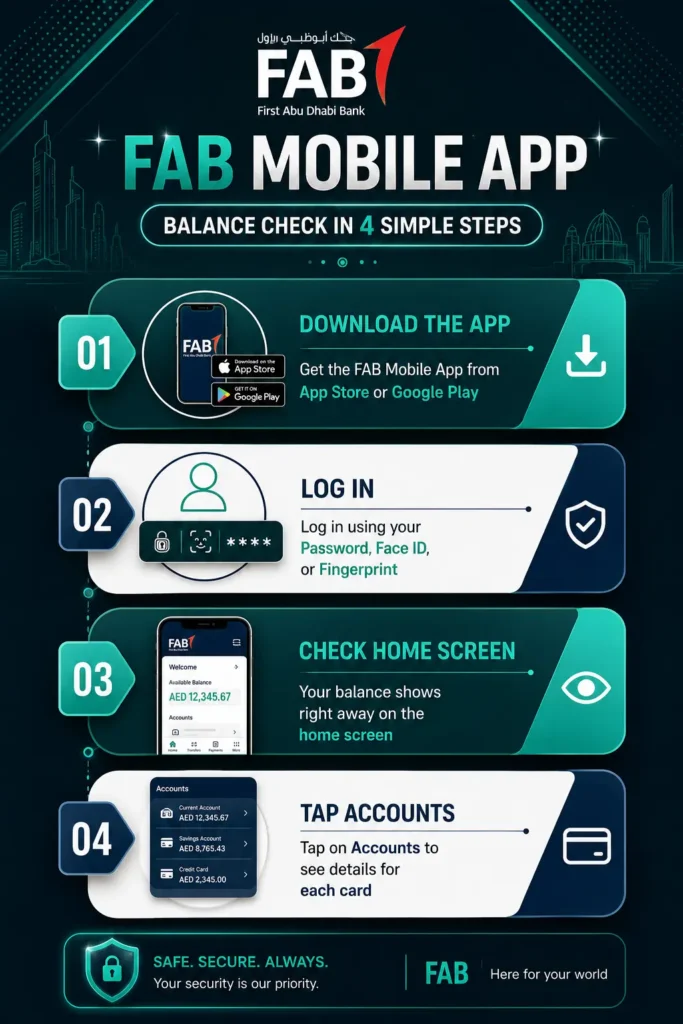
The FAB Mobile App is the fastest way to see your balance. It takes about 10 seconds once you are logged in.
Steps to check your balance on the app:
- Download the FAB Mobile App from the App Store or Google Play.
- Open the app and log in with your username and password, or use Face ID or your fingerprint.
- Your balance shows on the home screen right away.
- Tap Accounts to see more details for each account or card.
What else the app can do:
- Show all your accounts and cards in one place.
- Let you download bank statements.
- Send you an alert when money moves in or out.
- Let you block or unblock a lost card.
- Let you transfer money and pay bills.
Tip: Turn on push notifications. This way, you get a message every time your salary or any money comes in. You will not need to open the app to know your balance changed.
FAB Balance Check via Online Banking (Website)
If you prefer using a computer, FAB Online Banking works well. You do not need to install anything.
Steps to check your balance online:
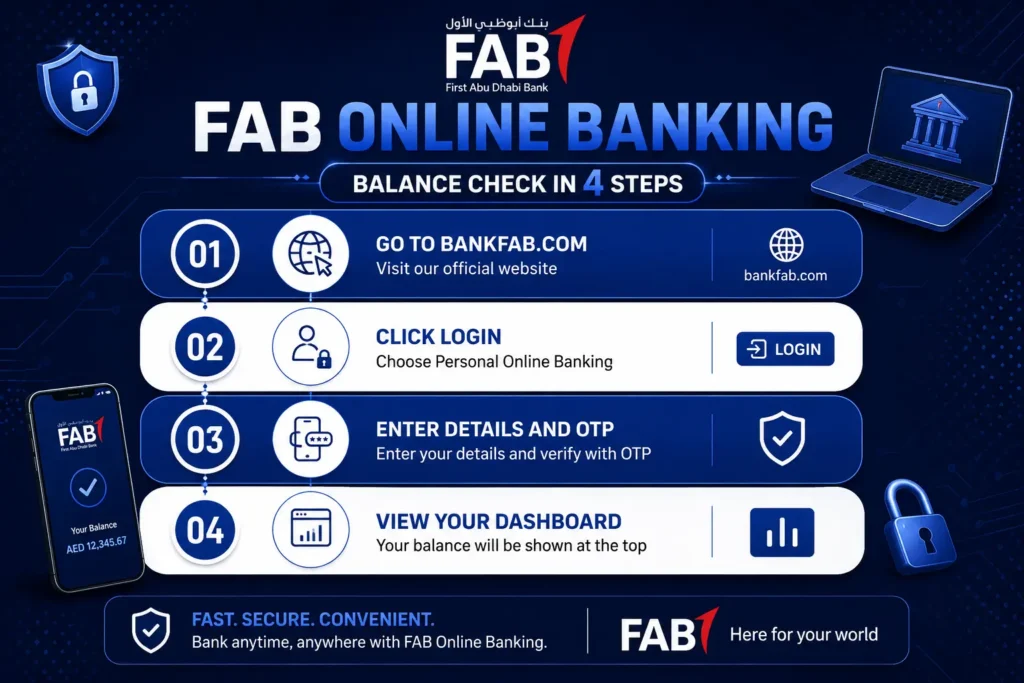
- Open your browser and go to bankfab.com.
- Click Login at the top of the page.
- Choose Personal Online Banking.
- Type in your username and password, then click Login.
- FAB will send a code (called an OTP) to your phone or email. Type this code in to continue.
- Your dashboard opens. Your balance is shown at the top.
What your dashboard shows:
- Available balance and ledger balance, side by side.
- Your most recent transactions.
- A list of all your accounts and cards.
Other things you can do from here:
- Download an e-statement in PDF form.
- Get an official account certificate with the bank’s stamp.
- Transfer money to another account.
- Pay bills like electricity or phone.
Tip: If your balance looks wrong, refresh the page. Sometimes it takes a moment to update after a new payment.
FAB Balance Check via ATM
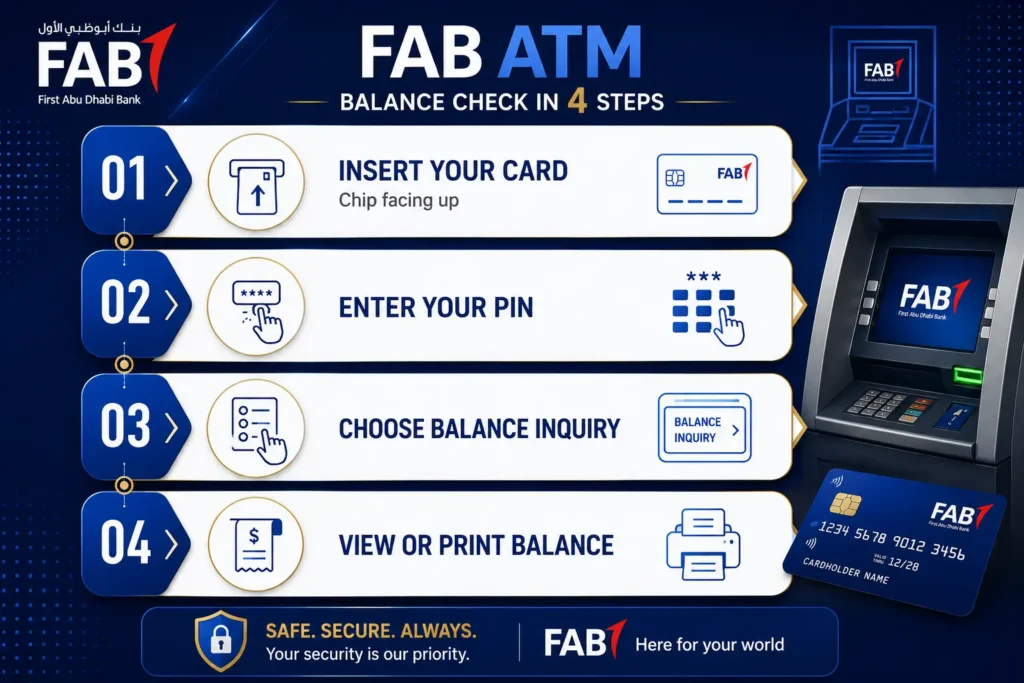
Checking your balance at an ATM does not need internet or a smartphone. It is one of the quickest offline ways to see your money.
Steps to check your balance at an ATM:
- Find a FAB ATM near you. You can search “FAB ATM near me” on Google Maps.
- Put your card into the machine with the chip facing up.
- Type in your 4-digit PIN. Cover the keypad with your other hand while you type.
- Pick your language, English or Arabic.
- Choose Balance Inquiry from the menu.
- If you have more than one account, pick the one you want to see.
- Your balance shows on the screen. You can print a receipt if you want one.
FAB ATMs across the UAE:
FAB has ATMs in most major cities, open 24 hours a day. You can find them in:
- Abu Dhabi
- Dubai
- Sharjah
- Al Ain
- Ajman
- Ras Al Khaimah
- Fujairah
Good to know: Checking your balance at a FAB ATM is free. If you use another bank’s ATM, they may charge you a small fee.
If something goes wrong:
- Card not reading: Wipe the chip and try again, or use a different ATM.
- PIN not working: Type slowly and carefully. If your card gets blocked, call FAB.
- Balance not showing: Wait a few seconds and try again.
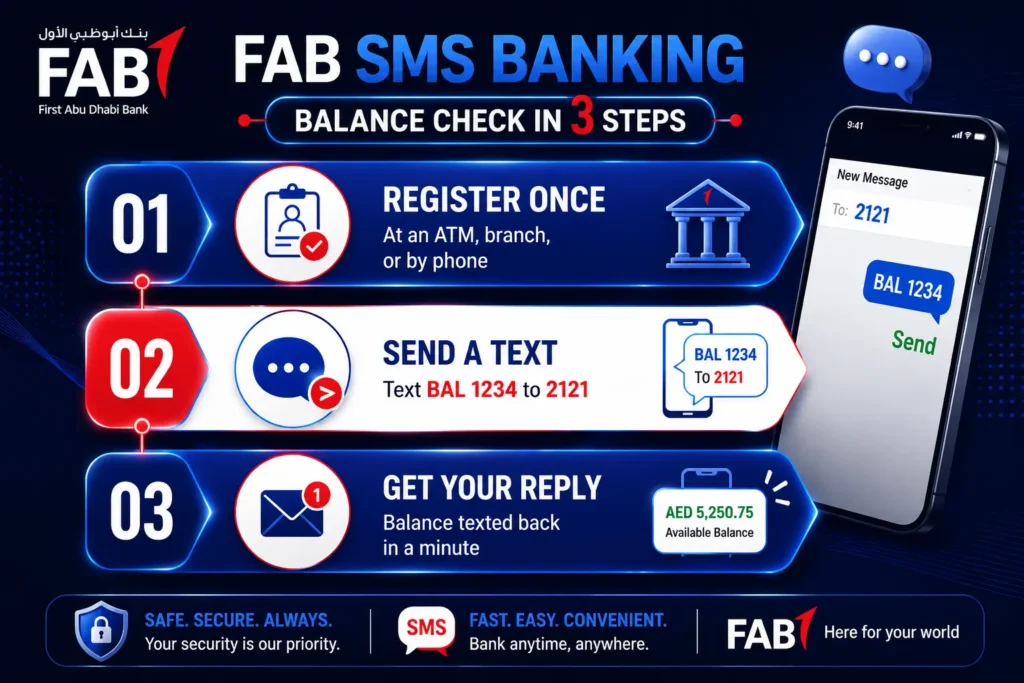
FAB Balance Check via SMS Banking
SMS banking works even if you have no internet and an old phone. You just need to send a text message.
Step 1: Register for SMS banking
You can only use SMS banking after you register. Do this one time in any of these three ways:
- At an ATM: Insert your card, enter your PIN, choose SMS Banking, then Register. Set a 4-digit SMS PIN.
- By phone: Call FAB customer care and ask them to register you.
- At a branch: Visit any FAB branch with your Emirates ID and card.
Step 2: Send the balance check SMS
- Open your phone’s messaging app.
- Type a new message: BAL 1234. Replace 1234 with the last four digits of your account number.
- Make sure there is a space between BAL and the numbers.
- Send it to 2121.
Step 3: Get your reply
Within a minute, you will get a text back with:
- Your available balance
- Your ledger balance
- The last four digits of your account (for safety, the rest stays hidden)
- Your last transaction
Good to know: Your phone company may charge a small fee for the SMS. FAB itself does not charge for this service.
If you do not get a reply:
- Make sure you are texting from your registered phone number.
- Check that you typed BAL with a space, then the numbers.
- Wait two minutes, then try sending it again.
FAB Balance Check via Phone Banking (IVR)
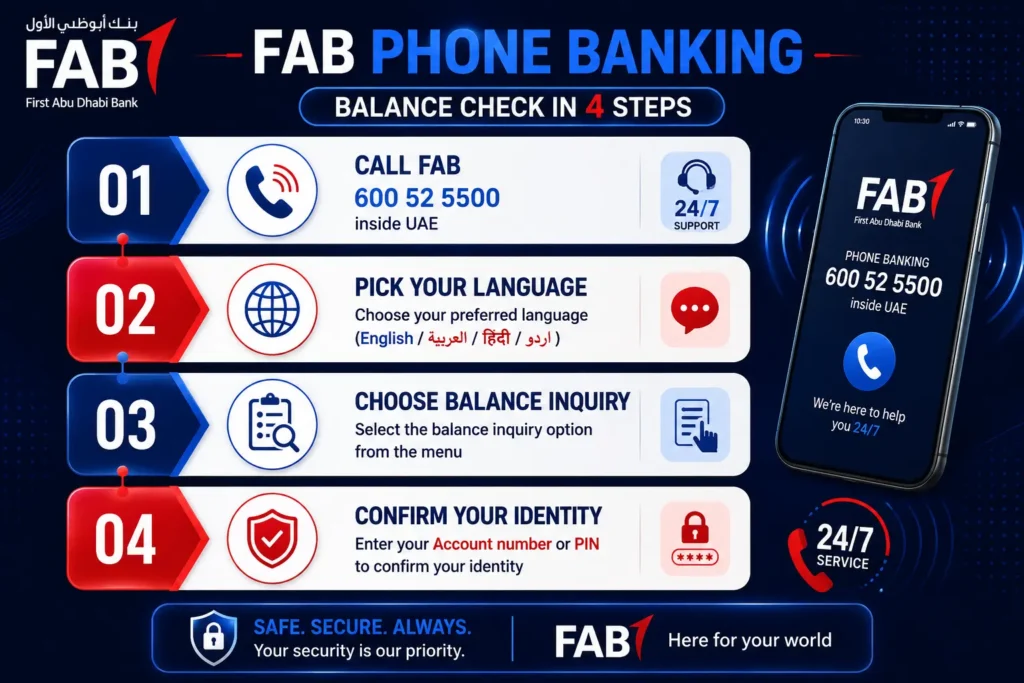
You can check your balance by calling FAB. You do not need a smartphone or internet for this.
Numbers to call:
- Inside UAE: 600 52 5500
- Outside UAE: +971 2 681 1511
Steps to check your balance by phone:
- Call the number above.
- Pick your language. Press 1 for English or 2 for Arabic.
- Choose Account Services or Balance Inquiry from the menu.
- The system will ask for your account number and date of birth, or your PIN.
- Listen as the system reads out your balance.
IVR vs talking to a real person:
| Automated System (IVR) | Live Agent | |
|---|---|---|
| Speed | 2 to 3 minutes | 3 to 7 minutes |
| Best for | Quick checks | Harder problems |
| Wait time | None | 1 to 5 minutes |
| Info you get | Balance and last transaction | Balance plus help with other issues |
Tip: If the system is confusing, just wait or press 0. This usually connects you to a real person.
FAB Balance Check via AI Virtual Agent
FAB uses a smart voice system called the AI Virtual Agent. It works like a real person but is fully automatic.
How it works:
- Call FAB customer care using the numbers above.
- Wait for the AI voice to answer your call.
- Speak normally. You do not need special words. Just say, “I want to check my account balance.”
- The system may ask you to confirm your identity with your account number or Emirates ID.
- Once verified, it reads your balance out loud.
What the AI Virtual Agent can do:
- Check your account balance
- Show your recent transactions
- Answer questions about card limits
- Help with lost or blocked cards
- Send you to a human agent if needed
Good to know: This system understands normal talking. You do not need to say exact commands like a robot.
FAB Balance Check by Visiting a Branch
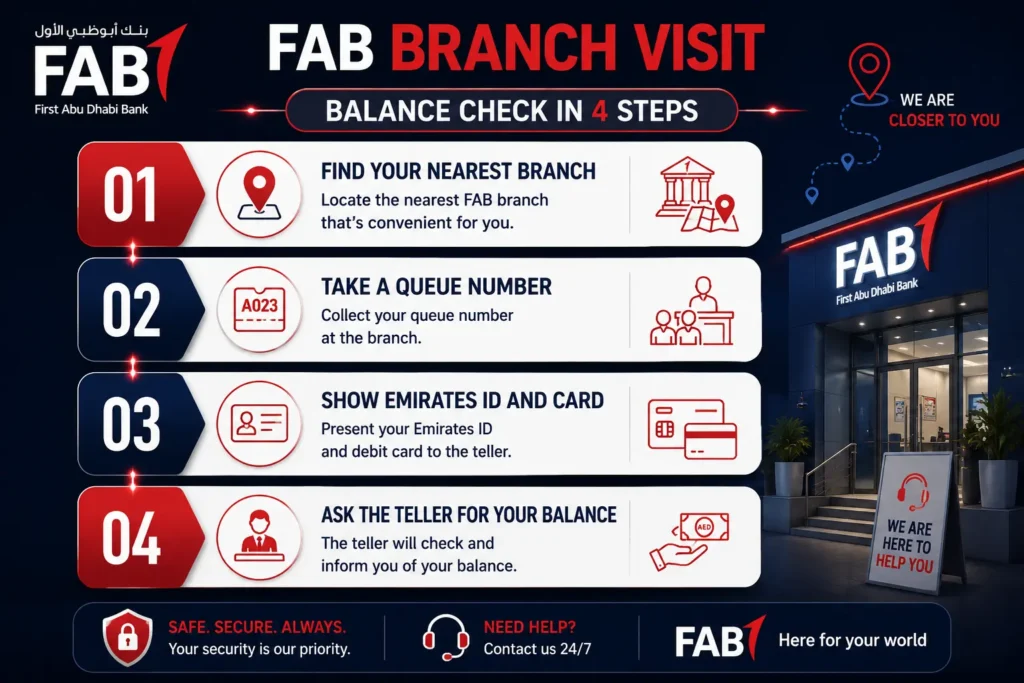
Some people prefer talking to a person face to face. You can do this at any FAB branch.
What to bring:
- Your Emirates ID
- Your FAB card, if you have one
- Your account number, if you know it
Steps at the branch:
- Find your nearest branch using the FAB website or app.
- Take a queue number from the ticket machine.
- Wait for your number to be called.
- Tell the teller you want to check your balance.
- Show your Emirates ID and card when asked.
- The teller will tell you your balance or print it for you.
Extra help you can get at a branch:
- A mini statement of your last 5 to 10 transactions
- A full account statement for any date range
- An official account certificate with the bank’s stamp
Branch hours: FAB branches are open Sunday to Thursday, 8 AM to 2 PM. They are closed on Friday and Saturday.
FAB Prepaid Card Balance Check (PPC Magnati Portal)
If you have a FAB prepaid card, you check your balance in a different place. This portal is called PPC Magnati.
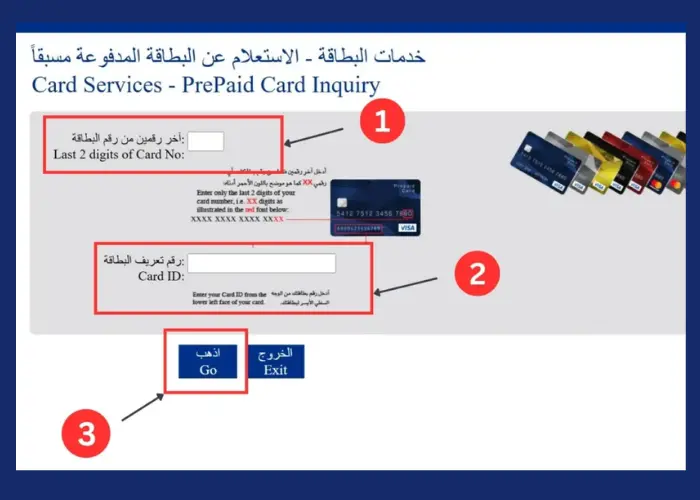
Steps to check your prepaid card balance:
- Go to the PPC Magnati Inquiry website.
- Type in the last 4 digits of your card number.
- Type in your Card ID. This is a short code printed on your card.
- Fill in the CAPTCHA box to show you are not a robot.
- Click Go.
What you will see:
- Your current balance
- Your last 5 to 10 transactions
- Your card status (active, expired, or blocked)
- Options to reload money if your card allows it
If the portal rejects your details:
- Check that you typed your Card ID, not your full card number.
- Make sure your card type is supported by this portal. Not all FAB cards use PPC Magnati.
Good to know: This site does not save or store your card details. It only shows you your balance.
FAB Ratibi Card Balance Check
The Ratibi card is a special salary card. It is made for workers who earn up to AED 5,000 a month. Many workers use it without needing a full bank account.
Steps to check your Ratibi balance:
- Go to the official FAB Ratibi balance page.
- Choose Ratibi Prepaid Card Balance Enquiry.
- Type in your card details as asked.
- Complete the security check.
- Your balance will show on the screen.
Other ways to check Ratibi balance:
- Use a supported FAB ATM.
- Use the Payit app, which links directly to your Ratibi card.
- FAB sends a free SMS alert each time your salary is added.
Ratibi support numbers:
- Inside UAE: 600 522298
- Outside UAE: +971 2 4996279
FAB Salary Account Balance Check
A salary account is not the same as a Ratibi card. A salary account is a full bank account where your pay is sent each month.
Ways to check your salary account balance:
- Open the FAB app and look at your account.
- Check your monthly account statement sent by email.
- Use an ATM with your debit card.
- Send an SMS if you are registered for SMS banking.
Why your balance may look delayed:
Your salary may show up at an ATM before it shows in the app. This is normal. It can take a few hours for all systems to match.
FAB Credit Card Balance Check
A credit card balance works differently than a debit card. It shows money you owe, not money you have.
Three numbers to know:
- Outstanding balance. The total amount you currently owe.
- Available credit. How much of your credit limit is left to use.
- Minimum due. The smallest amount you must pay to avoid a late fee.
Steps to check your credit card balance:
- Open the FAB app or log in to online banking.
- Tap or click on your credit card.
- Your outstanding balance and available credit will show on the screen.
Other ways:
- Check your monthly e-statement.
- Call FAB customer care and ask for your card balance.
- Some ATMs let you choose “Credit Card Services” then “Balance Enquiry.”
Cash advance warning: If you take cash out using your credit card, FAB charges a fee. This fee is usually 3.15% of the amount, with a minimum charge of AED 157.50. Interest can also apply right away.
NBAD Prepaid Card Balance Check
NBAD was a bank that joined with FAB in 2017. Some people still use old NBAD prepaid cards today.
How to check an NBAD card balance:
- Go to the PPC Magnati portal, the same site used for FAB prepaid cards.
- Enter your card number and Card ID.
- Complete the CAPTCHA and click Go.
If your NBAD card does not work on the portal:
- Your card type may be too old to support online checks.
- Visit a FAB branch or call customer care for help.
- Ask about replacing your old NBAD card with a new FAB card.
FAB Balance Check via Payit Wallet
Payit is a digital wallet made by FAB. It is not the same as your bank account. It holds its own separate balance.
Steps to check your Payit balance:
- Download the Payit app from the Google Play Store.
- Open the app and log in, or sign up if you are new.
- If you have a Ratibi card, choose Ratibi Card Holder.
- Link your FAB account or Ratibi card using your card number and Emirates ID.
- Confirm the link with an OTP sent to your phone.
- Tap Wallet Balance to see your current funds.
What you can do with Payit:
- Send money to friends or family
- Pay bills
- Shop online
- Withdraw cash at some FAB ATMs without a card, using a code
If your balance shows zero or looks wrong:
- Check your Wi-Fi or data connection.
- Log out, then log back in.
- Clear the app’s stored data in your phone settings, then reopen it.
Important: Your Payit balance and your FAB bank balance are two different numbers. Do not mix them up.
Comparison of All FAB Balance Check Methods
Use this table to pick the best method for your situation.
| Method | Speed | Needs Internet | Fees | Best For |
|---|---|---|---|---|
| Mobile App | Instant | Yes | Free | Daily checks |
| Online Banking | Fast | Yes | Free | Detailed account view |
| ATM | Instant | No | Free (FAB ATMs) | Quick offline checks |
| SMS Banking | 1-2 minutes | No | SMS fee may apply | No internet situations |
| Phone Banking | 3-7 minutes | No | Free | Non-tech users |
| AI Virtual Agent | Fast | No | Free | Voice-based checks |
| Branch Visit | 15-30 minutes | No | Free | Face to face help |
| PPC Magnati Portal | Fast | Yes | Free | Prepaid card users |
| Payit App | Instant | Yes | Free | Ratibi and wallet users |
How to Register for SMS Banking
SMS banking needs a one-time setup before you can use it.
Three ways to register:
- At an ATM: Insert your card, enter your PIN, choose SMS Banking, then Register. Confirm your number and set a 4-digit SMS PIN.
- By calling customer care: Give your account number, Emirates ID, and mobile number. Choose a 4-digit SMS PIN.
- At a branch: Bring your Emirates ID and card. Ask the teller to register you.
Once done, you can send BAL 1234 to 2121 anytime to check your balance.
How to Register for FAB Online Banking
Setting up online banking takes just a few minutes.
Steps to register:
- Go to bankfab.com and click Login.
- Choose Personal Online Banking, then Register Now.
- Enter your debit or credit card number and PIN.
- Enter your registered mobile number.
- Create a username and password.
- Set up your security questions.
- Confirm everything with the OTP sent to your phone or email.
Once done, you can log in anytime from any device to check your balance.
How to Reset FAB Online Banking Password
Forgot your password? You can reset it yourself in a few steps.
Steps to reset your password:
- Go to the FAB Online Banking login page.
- Click Forgot Password.
- Enter your User ID and registered mobile number or email.
- Type in the OTP sent to you.
- Create a new password using letters, numbers, and symbols.
- Log in with your new password.
Tip: Never share your password with anyone, even someone who says they work for FAB.
Common FAB Balance Check Errors and Fixes
Sometimes checking your balance does not go smoothly. Here is how to fix common problems.
| Problem | Why It Happens | How to Fix It |
|---|---|---|
| Cannot log in | Wrong username or password | Use “Forgot Password” to reset it |
| Account locked | Too many wrong tries | Wait a few minutes, then try again |
| No SMS reply | Wrong phone number or format | Text from your registered number using BAL 1234 |
| ATM balance not showing | Network issue | Try again or use a different ATM |
| App crashing | Old app version | Update the app from your app store |
| PPC portal rejects details | Wrong field filled in | Double check Card ID vs full card number |
| Balance looks wrong | Pending transaction | Wait a few hours and check again |
| OTP not received | Wrong contact info on file | Update your number, then request a new OTP |
How to Open a FAB Account
Opening a FAB account is easy if you use the mobile app.
Steps to open an account:
- Download the FAB Mobile App.
- Tap Join FAB to start your application.
- Scan your Emirates ID using your phone camera.
- Take a selfie to confirm your identity.
- Enter your personal details, like your mobile number and job info.
- Choose the account type you want.
- Submit your application.
What you need:
- A valid Emirates ID
- A smartphone with a good camera
- A stable internet connection
- A minimum monthly salary of AED 3,000
Your account is usually ready within 2 business days.
How to Download Your FAB Bank Statement
A bank statement shows all your account activity for a chosen time period. You may need this for visas, loans, or rental agreements.
Steps to download your statement:
- Log in to the FAB app using your PIN or biometrics.
- Choose the account you want a statement for.
- Tap Statements & Documents.
- Pick your time range: last 3 months, last 6 months, or a custom date range.
- Tap Download to get your PDF.
- Save it to your phone or share it by email.
Why you may need it:
- To prove you have enough money for a visa
- To show regular income for a loan
- To settle a dispute over a transaction
Final Thoughts
FAB gives you many simple ways to check your balance. If you want speed, use the app. If you have no internet, use an ATM or SMS. Pick the method that fits your day, and you will always know exactly how much money you have.